Selecting a custom touch display requires understanding your device requirements, environment, and user needs. At FANNAL, we combine engineering expertise and flexible customisation to provide touch solutions that meet industrial, medical, automotive, and outdoor demands. This guide helps you match the right technology, structure, and parameters to your project.
Touch Display Selection Matrix by Industry
Requirement
Medical Device
Outdoor Kiosk
Industrial HMI
Primary Goal
Clarity & Safety
Sunlight Readability
Durability & EMI
Touch Tech
High-Sensitivity PCAP
Rugged PCAP / IR
PCAP or Resistive
Enhancement
Antimicrobial Coating
Optical Bonding (1000+ nits)
AG/AR Coating
Interface
MIPI / eDP
HDMI / USB
LVDS / RGB
Define the Scope of Your Project
Before selecting any custom touch display, I always start with a clear definition of the device requirements. This step sets the foundation for all later decisions.
Key factors I evaluate:
Screen size & aspect ratio – fits UI layout and mechanical design.
Touch sensitivity – finger, glove, passive stylus, or active pen.
Special needs – optical bonding, custom cover lens printing, IP sealing, IK impact resistance, EMI performance.
Having these listed early saves time, prevents redesigns, and ensures the final touch module fits the real application.
Understand the Environment and Usage
A touch display that works well in an office may fail outdoors or in a harsh factory. The environment strongly influences the type of touch technology, structure, bonding, and materials you choose.
Industrial & Harsh Environments
Industrial applications require a touch display that remains stable in challenging conditions such as dust, oil, vibration, moisture, and electrical noise.
My priorities include:
Robust structures like GG or GFF for mechanical strength.
Wide-temperature components (−20°C to 70°C): touch IC, cover glass, display, AD board.
EMI-resistant ICs with proper shielding near motors or high-power systems.
Waterproof or IP-rated sealing for environments with liquid exposure.
Glove operation tuning or even resistive touch when needed.
These ensure stable operation even in electrically noisy or physically demanding environments.
Medical Applications
Medical devices must be reliable, cleanable, and supported for long certification cycles. Once a medical product is approved, component changes become extremely difficult.
What I focus on:
Smooth, sealed cover lens suitable for frequent disinfection.
Anti-bacterial & anti-fingerprint coatings for hygiene.
Industrial-grade components for long lifecycle and consistent availability.
Durable, scratch-resistant. Best for rugged devices.
GF (Glass–Film)
Good balance of cost and sensitivity. Used in many consumer devices.
GFF (Glass–Film–Film)
More flexible design and stable performance.
OGS (One Glass Solution)
Thinner, lighter, and great for modern sleek devices.
Consider In-Cell and On-Cell Technologies
For slim devices or high-end displays, I look at these:
In-Cell integrates touch into the display panel
On-Cell places sensors on top of the panel
Feature
In-Cell
On-Cell
Thickness
⭐ Thinnest
Thinner than GG/GF
Optical clarity
⭐ Best
Very good
Touch sensitivity
⭐ Highest
High
Cost
Highest
Mid-range
Customizability
Low
Medium
Rugged / Thick Glass support
Weak
Better
Production yield
Lower
Higher
I usually choose:
In-Cell → when ultra-slim design and premium visual performance matter more than cost.
On-Cell → when I need a good balance of price, performance, and design freedom.
Traditional PCAP (GG/GF/GFF) → when I need durability, thick cover lenses, custom shapes, or industrial reliability.
Check Display Performance Requirements
1. Brightness Levels
Indoor: 250–400 nits
Semi-outdoor: 500–800 nits
Sunlight-readable: 1000–2000+ nits
High brightness is critical for outdoor readability, especially when combined with AG/AR coatings and optical bonding.
2. Optical Bonding
I often choose optical bonding for:
Higher clarity
Lower reflection / anti-glare
Better outdoor performance
Anti-condensation
Increased structural strength and durability
3. Temperature & Operating Range
Industrial / Outdoor devices: −20°C to 70°C (special cases up to −40°C to 85°C)
Medical devices: 0°C to 50°C
All touch display components (touch IC, AD board, cover glass, backlight) must maintain stable performance across the entire operating temperature range.
4. Contrast & Color Accuracy
Contrast: ensures readability under strong light
Color accuracy: essential for medical devices, imaging equipment, and professional displays
Color gamut: high-end displays may require sRGB or Adobe RGB coverage
5. Response Time & Refresh Rate
Industrial or operational devices require low-latency touch response
Visual applications (kiosks, signage) may prioritize smooth animations and high refresh rates
6. Viewing Angle
Industrial, medical, and outdoor displays are often viewed from multiple angles
Wide viewing angle panels (IPS, AHVA, OLED) prevent color shift and dark corners
7. Backlight & Lifetime
LED or OLED backlight lifetime impacts maintenance and total cost of ownership
High-brightness screens require robust backlight design and thermal management
8. Environmental Protection
Water and dust resistance (IP65, IP67, etc.)
Shock and impact resistance (IK rating)
UV resistance or anti-explosion glass for outdoor applications
Set a Realistic Budget (Short-Term vs Long-Term Cost)
Cheaper touch display may save cost at first, but often lead to:
Early failures
Glitches in touch sensitivity
Inconsistent quality between batches
Redesigns or costly maintenance
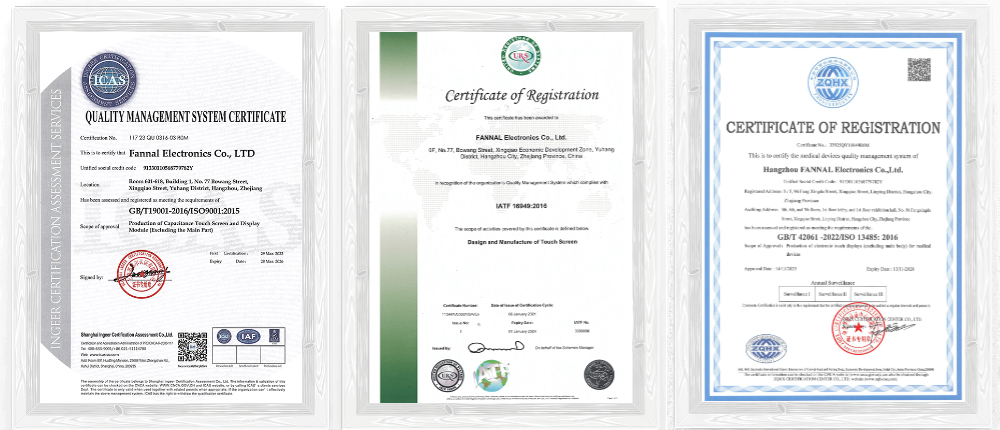
Working with a supplier like FANNAL, with in-house production, strict QC, and certifications such as ISO 9001 / IATF 16949 / RoHS / REACH, helps me ensure long-term stability.
I always request a detailed cost breakdown to understand the value of each feature.
Conclusion
Choosing the right touch display requires understanding requirements, environment, and performance needs. FANNAL combines engineering expertise, flexible customisation, and industrial-grade components to ensure reliable, high-performance displays for any application. From prototypes to mass production, our displays are engineered for your project’s success.
A1: FANNAL provides LCD panels from 1.77" to 15.6", with IPS, TN, or LTPS types, suitable for industrial (-20°C ~ 70°C) and automotive (-30°C ~ 85°C) applications.
Q2: Which touch structures are available for FANNAL’s PCAP touchscreens?
A2: Touch structures include G+G (Glass–Glass), G+F+F (Glass–Film–Film), and OGS (One Glass Solution). Sizes range up to 65", supporting multi-touch, glove operation, passive pen, and waterproof designs.
Q3: What backlight brightness and lifetime options are available?
A3: Backlights can reach up to 30,000 cd/m² for outdoor or industrial use, with a lifetime up to 50,000 hours, depending on module material (metal, plastic, or hybrid).
Q4: Which optical bonding methods can FANNAL provide?
A4:
OCA – up to 15.6”
LOCA / OCR – up to 32”
Silicone bonding – up to 32”, ideal for rugged large industrial displays
Q5: What touch controllers (IC) does FANNAL use?
A5: Trusted IC partners include EETI, ILITEK, GOODiX, FocalTech, Cypress, Microchip. All firmware tuning and optimisation are performed in-house to ensure high reliability and anti-interference performance.